We created this site to represent something similar to Wikipedia, but offering "QUALITY" interesting facts about anything that could tickle your brain. There are many facts in this world that should be known by everyone. We are trying spread the word about all the good and bad things that might interest you. If you are interested in particular fact please do not hesitate to send us your research about it.
Flash Vortex
Sunday, September 25, 2011
Tirupati Laddu Facts
Laddu, or Ladoo, is one of the most important offering and prasadam given to devotees at the Tirumala Tirupati Lord Venkateswara Temple. Tirupati Laddu is a spherical-shaped sweet made of flour and sugar. In fact, Tirupati and the huge laddus are synonymous. It is a customary duty of a devotee returning from Tirupati Balaji Temple to distribute ‘laddu’ as prasadam to his neighbors, friends and relatives.
Some quick facts about Tirupati Laddu
Around 150,000 laddus are made daily.
One laddu is given free to each devotee; the number of daily devotees that visit the temple is around 50,000.
A devotee can buy extra two laddus – a small laddu costs 25 rupees and big laddu costs 100 rupees.
The revenue from the sale of laddu annually is more than 11 million rupees.
Each laddu weighs around 100gms and is huge when compared with the normal laddu found in shops.
There is a super huge Tirupati Laddu known as Kalyana Laddu and it weighs around 500gms – ½ a kilogram.
Single largest laddu made is said to have weighed 32 kg.
The tradition of Tirupati Laddu is nearly 300 years old.
It is prepared by special hereditary priests known as archakas in special temple kitchen known as ‘potu’.
Ingredients used in Tirupati Laddu are Besan flour (kadalai mavu), Sugar, Cashew nuts, Cardamom, Ghee, Oil, Sugar candy, Raisins and Almonds.
On a day around 5000 kg of Besan flour is used.
Sugar around 10000 kg.
Cashew nuts around 600 kg.
Cardamom 150 kg
Ghee 300 liters
Sugar candy 400 kg
Raisins 540 kg
The ingredients are bought at the auction at the Commodities and Spices Exchange in Kochi.
Tirumala Tirupati Devasthanams (TTDs) the administrating body of the temple is planning to patent the Tirupati Laddu to stop counterfeits.
Read More On: Interesting Facts, Tirumala, Tirupati
Friday, September 23, 2011
14 Interesting Facts About Google
#1 The prime reason the Google home page is so bare is due to the fact that the founders didn’t know HTML and just wanted a quick interface. In fact it was noted that the submit button was a long time coming and hitting the RETURN key was the only way to burst Google into life.
#2 Due to the sparseness of the homepage, in early user tests they noted people just sitting looking at the screen. After a minute of nothingness, the tester intervened and asked ‘Whats up?’ to which they replied “We are waiting for the rest of it”. To solve that particular problem the Google Copyright message was inserted to act as a crude end of page marker.
#3 One of the biggest leap in search usage came about when they introduced their much improved spell checker giving birth to the “Did you mean…” feature. This instantly doubled their traffic, but they had some interesting discussions on how best to place that information, as most people simply tuned that out. But they discovered the placement at the bottom of the results was the most effective area.
#4 The infamous “I feel lucky” is nearly never used. However, in trials it was found that removing it would somehow reduce the Google experience. Users wanted it kept. It was a comfort button.
#5 Orkut is very popular in Brazil. Orkut was the brainchild of a very intelligent Google engineer who was pretty much given free reign to run with it, without having to go through the normal Google UI procedures, hence the reason it doesn’t look or feel like a Google application. They are looking at improving Orkut to cope with the loads it places on the system.
#6 Google makes changes small-and-often. They will sometimes trial a particular feature with a set of users from a given network subnet; for example Excite@Home users often get to see new features. They aren’t told of this, just presented with the new UI and observed how they use it.
#7 Google has the largest network of translators in the world
#8 They use the 20% / 5% rules. If at least 20% of people use a feature, then it will be included. At least 5% of people need to use a particular search preference before it will make it into the ‘Advanced Preferences’.
#9 They have found in user testing, that a small number of people are very typical of the larger user base. They run labs continually and always monitoring how people use a page of results.
#10 The name ‘Google’ was an accident. A spelling mistake made by the original founders who thought they were going for ‘Googol’
#11 Gmail was used internally for nearly 2years prior to launch to the public. They discovered there was approximately 6 types of email users, and Gmail has been designed to accommodate these 6.
#12 They listen to feedback actively. Emailing Google isn’t emailing a blackhole.
#13 Employees are encouraged to use 20% of their time working on their own projects. Google News, Orkut are both examples of projects that grew from this working model.
#14 This wasn’t a technical talk so no information regarding any infrastructure was presented however they did note that they have a mantra of aiming to give back each page with in 500ms, rendered.
What Happens Inside Your Computer?
Let's go through the steps of the events that occur from the time you first push the power button on your computer to the time you click the "shut down" button.
1. You press the buttons to turn on your monitor and computer.
2. A signal is sent to your power supply telling it to turn on. The power supply is what keeps your entire computer system running; it is what makes the difference between a box with a whole bunch of odd-looking devices connected to it and a working computer system! The power supply changes the electrical current from the outlet in your wall into a voltage that can be used by your computer.
3. The fans found in the power supply will begin working. These fans are vital to your computer system. They circulate the air inside the computer case to make sure that the devices do not overheat!
4. Your computer's BIOS(Basic Input) goes to work. BIOS is the software that gives your CPU its first instructions when the computer is turned on. Your BIOS will:
Perform a power-on self-test (POST), an inspection checking to make sure that all of your computer's components are working properly.
Check to see if a reboot is necessary. If not, then it will perform a read/write test for your computer's random-access memory (RAM), it will check the keyboard and the mouse, and it will also check the PCI bus and expansion cards. You will see a string of text on your computer screen as your computer's BIOS checks everything.
Check the CMOS (Complementary Metal Oxide Semiconductor) for your system settings. It will check for what components are installed in your computer system as well as for important information concerning your computer's operating system.
Usually, you will see a string of words on a black screen when your computer first turns on. This is your BIOS system displaying information about your computer's central processing unit, information about how much memory your computer has, as well as information about your hard disk drives and floppy disk drives.
5. The bootstrap loader will load the your computer's operating system into the computer's memory. Bootstrap, or boot, for short, is the process of loading the operating system. The whole process of loading your operating system is called booting up your computer.
6. The operating system will go to work. At this point, all control of your computer system is transferred from the BIOS to the operating system. The tasks your operating system must perform can be broken up into six major categories:
Processor Management: The operating system breaks tasks down into chunks that your CPU can handle and it prioritizes the tasks before sending them off to the processor.
Memory Management: The OS coordinates the information as it flows in and out of the computer's random-access memory.
Device Management: The operating system will let the numerous devices that are part of your computer system communicate with each other and with the central processing unit.
Storage Management: The OS will direct data and information to the places where they are to be stored.
Application Interface: The operating system lets your computer's hardware interface, or talk to, the software.
User Interface: Of course, now you'll need someway to communicate with your computer. This is controlled by your operating system.
7. You open up and run certain programs or applications. First, let's say you open up a word document to type a letter to your Great-Aunt Betty.
Your operating system will realize that you have a word processor open, so when you use either the keyboard or the mouse to input information, it will know to accept the information you input for the word document. Sometimes, if you have more than one program open at a time, your operating system will have to determine which program it is that you are using at the given time, but for now, we will just concentrate on the word processor.
8. Let's say you wanted to type in the letter "D"
You press the "D" key on the keyboard
Your keyboard will send an electrical signal to your computer telling it that you have just pressed a button
The keyboard controller will send an interrupt to the central processing unit telling it to take a look at the key you just pressed. The "D" will be temporarily stored in a special memory until your CPU is ready to deal with it.
Most often, your CPU also has to deal with other tasks. Your operating system will prioritize these tasks. Finally, it is time for your CPU to deal with the key you just pressed.
The CPU determines which program you were using when you pressed the key. In this case, you were in a word processor.
The CPU will tell your operating system to display the letter "D" on the screen. The letter is displayed by adding it to your graphics card, which tells your monitor what to display on the screen! This seems like a long and complicated process, but it occurs almost instantaneously! That shows how fast a computer is!
9. Now, you've finished typing your letter to Great-Aunt Betty, and you want to save it. When you press the "save" button in your word processor, a message will be sent to the operating system. A window will pop up, in which you can choose where you want to save the document to. Then, the operating system will transfer the document from the computer's RAM to the specified storage device.
10. After you have saved your letter, you decide that you want to print it out. Your operating system will translate the file from its present form into a form that your printer can comprehend. Then, your printer will go to work!
11. Now, that you've finished your letter, you decide that you want to go online to chat with some friends. You open up a web browser. Once again, it is your operating system that controls everything. This time, you can either type in the URL of the website you want to go to, or click on a link. By using a modem, your browser software can direct you to the right website, which will be displayed on your monitor!
12. After you've finished chatting, you're done using your computer. You click on the "shut down" button.
13. The operating system will close any programs that you have left open. However, if it finds that you have left a word document open, and that the document contains unsaved information, a prompt will come up asking if you would like to save the file before you exit. How convenient!
14. The operating system will save your current settings for your computer system. This way, it will remember them the next time you turn on your computer.
15. Usually, your computer has special software that will automatically shut down its power supply. If not, you will have to manually press a button.
Did Neil Armstrong land on moon??
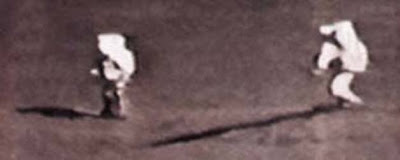
Issue 1 :
Since the Moon has only one light source, the Sun, the shadows must be in line. But in this cases, it looks as if there are multiple light sources in moon, which is not possible.
Issue 2:
The foreground of many images of the astronauts on the Moon are filled in with light, while the shadows remain absolutely black, again proving that there are multiple light sources.
Issue 3 :
There are no stars in the background from pictures taken on the Moon.
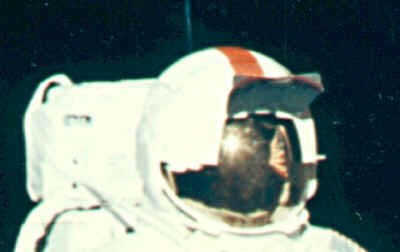
Issue 4 :
In some images, a huge light source can be seen reflected in the astronaut's visors. This has to be a very bright, nearby source. There is no possibility of external light source in moon.
Issue 5:
How could NASA take TV images of the LM ascending on Apollo 15, 16, and 17 if there was no one on the Lunar surface to man the camera?
Issue 6 :
There can't be any pictures taken on the Moon because the film would melt in the 250° temperatures. Any film exposed to 250° would indeed melt at that temperature.
Issue 7 :
The LM engine was very powerful. How come it did not leave a crater below the spacecraft? Why didn't it kick up any dust when it landed?
Issue 8:
The footprints left by the astronauts are proof that the Moon landings are fake. This one is also essentially a two pronged argument. First, the Fox show charged that the LM engine was so powerful that the upper layer of dust should have been blown away around the LM, so there should not be any footprints. Others have charged that the footprints should not be there since in the absence of water as a bonding agent, they should not maintain coherent shapes and sharp outlines.
Issue 9:
There is no dust on LM footpads. -- According to Kaysing and Fox, this is the strongest evidence that the Moon landings are faked. They allege that with the swirling dust from LM descent engine, the foot pads should be covered with dust.
Issue 10 :
The pictures below show that flags are waving. And they never will. The flag was on the airless Moon, just as we all knew.
THERE ARE MANY MORE ISSUES ON THIS, BUT THOSE ARE TOO TECHNICAL FOR ME..........
MAY BE.......NEIL ARMSTRONG WAS NOT THE FIRST PERSON TO LAND ON MOON !!!!
Since the Moon has only one light source, the Sun, the shadows must be in line. But in this cases, it looks as if there are multiple light sources in moon, which is not possible.
Issue 2:
The foreground of many images of the astronauts on the Moon are filled in with light, while the shadows remain absolutely black, again proving that there are multiple light sources.
Issue 3 :
There are no stars in the background from pictures taken on the Moon.
Issue 4 :
In some images, a huge light source can be seen reflected in the astronaut's visors. This has to be a very bright, nearby source. There is no possibility of external light source in moon.
Issue 5:
How could NASA take TV images of the LM ascending on Apollo 15, 16, and 17 if there was no one on the Lunar surface to man the camera?
Issue 6 :
There can't be any pictures taken on the Moon because the film would melt in the 250° temperatures. Any film exposed to 250° would indeed melt at that temperature.
Issue 7 :
The LM engine was very powerful. How come it did not leave a crater below the spacecraft? Why didn't it kick up any dust when it landed?
Issue 8:
The footprints left by the astronauts are proof that the Moon landings are fake. This one is also essentially a two pronged argument. First, the Fox show charged that the LM engine was so powerful that the upper layer of dust should have been blown away around the LM, so there should not be any footprints. Others have charged that the footprints should not be there since in the absence of water as a bonding agent, they should not maintain coherent shapes and sharp outlines.
Issue 9:
There is no dust on LM footpads. -- According to Kaysing and Fox, this is the strongest evidence that the Moon landings are faked. They allege that with the swirling dust from LM descent engine, the foot pads should be covered with dust.
Issue 10 :
The pictures below show that flags are waving. And they never will. The flag was on the airless Moon, just as we all knew.
THERE ARE MANY MORE ISSUES ON THIS, BUT THOSE ARE TOO TECHNICAL FOR ME..........
MAY BE.......NEIL ARMSTRONG WAS NOT THE FIRST PERSON TO LAND ON MOON !!!!
15 little known facts about India
The Indian economy is finally overcoming some of the obstacles that have traditionally been cumbersome to growth and today, India’s economic growth rate is among the fastest in the world, based largely on a flair for information technology and knowledge-based industries. As a result, India is providing an IT workforce for high tech companies around the world and is gradually on the path to becoming the “knowledge center” for the global technology economy.
Most of us know this, but here are 15 facts that you may not know. These facts are as of December 06, so some of them might have changed, especially number 6. If you have recent information, leave a comment and I will add it to the list:
India is one of only three countries that makes supercomputers (the US and Japan are the other two).
India is one of six countries that launches satellites.
The Bombay stock exchange lists more than 6,600 companies. Only the NYSE has more.
Eight Indian companies are listed on the NYSE; three on the NASDAQ.
By volume of pills produced, the Indian pharmaceutical industry is the world’s second largest after China.
India has the second largest community of software developers, after the U.S.
India has the second largest network of paved highways, after the U.S.
India is the world’s largest producer of milk, and among the top five producers of sugar, cotton, tea, coffee, spices, rubber, silk, and fish.
100 of the Fortune 500 companies have R&D facilities in India.
Two million people of Indian origin live in the U.S.
Indian-born Americans are among the most affluent and best educated of the recent immigrant groups in the U.S.
Thirty percent of the R&D researchers in American pharmaceutical companies are Indian Americans.
Nearly 49% of the high-tech startups in silicon Valley and Washington, D.C. are owned by Indians or Indian-Americans.
India sends more students to U.S. colleges than any country in the world. In 2004-2005, over 80,000 Indian students entered the U.S. China sent only 65,000 students during the same time.
In a case decided by the U.S. Supreme Court, an Indian-American woman scientist, Dr. Ananda Chakrabaty, won the argument that persons may be granted patents for useful manufacture of living organisms. She defeated the U.S. Patent Office, that argued that living things may not be patented, thus establishing the legal foundation for the biotech industry, (Diamond vs. Chakrabaty, 1980). Dr. Chakrabaty invented a microbe that eats oil spills.
Subscribe to:
Posts (Atom)